• About
    • Policies
    • Write For Us
    • Ads
    • How We Earn Money
  • Email Digest
  • Patreon
  • Shop
  • Resources
    • Archives
    • Conventions
    • Chat Portal
    • Free eBooks
    • Latest TTRPG News Summary
    • RPG Tips
    • RPG Tools
    • Short Film Roulette

Geek Native

From the land of Geek

  • Books
    • Comics
  • Games
    • Console
    • Mobile
    • PC
    • Tabletop & RPGs
  • Geek Stuff
    • Cool Tech
    • Art
    • Interviews
    • Sites
    • GameWyrd
      • Echoes from the Wyrd
      • Famous Last Words
      • The Lost Archives
      • Weird Awards
      • Wyrd Reviews
  • Movies
  • Music
  • TV
    • Anime
    • Online Shows
You are here: Home / Games / PC / 7 Beginner-Friendly Tips to P-Rank Every Level in ULTRAKILL

7 Beginner-Friendly Tips to P-Rank Every Level in ULTRAKILL

February 17, 2026 by Guest Writer

Leave a Comment

With the release of Ultrakill’s layer fraud likely coming this year, a wave of new players has jumped into the game and are looking to get a P rank in every level of the game. Despite how easy it sounds, it can be a daunting task for new players. Mastering speed, style, and killing all of the enemies at once is where new players struggle.

To get a P rank, you need to make sure the time, style, and kills are all S rank without any restarts during the run.

7 Beginner-Friendly Tips to P-Rank Every Level in ULTRAKILL

Core Tips to Help You P-Rank Any Level

1. Enable the P-rank HUD

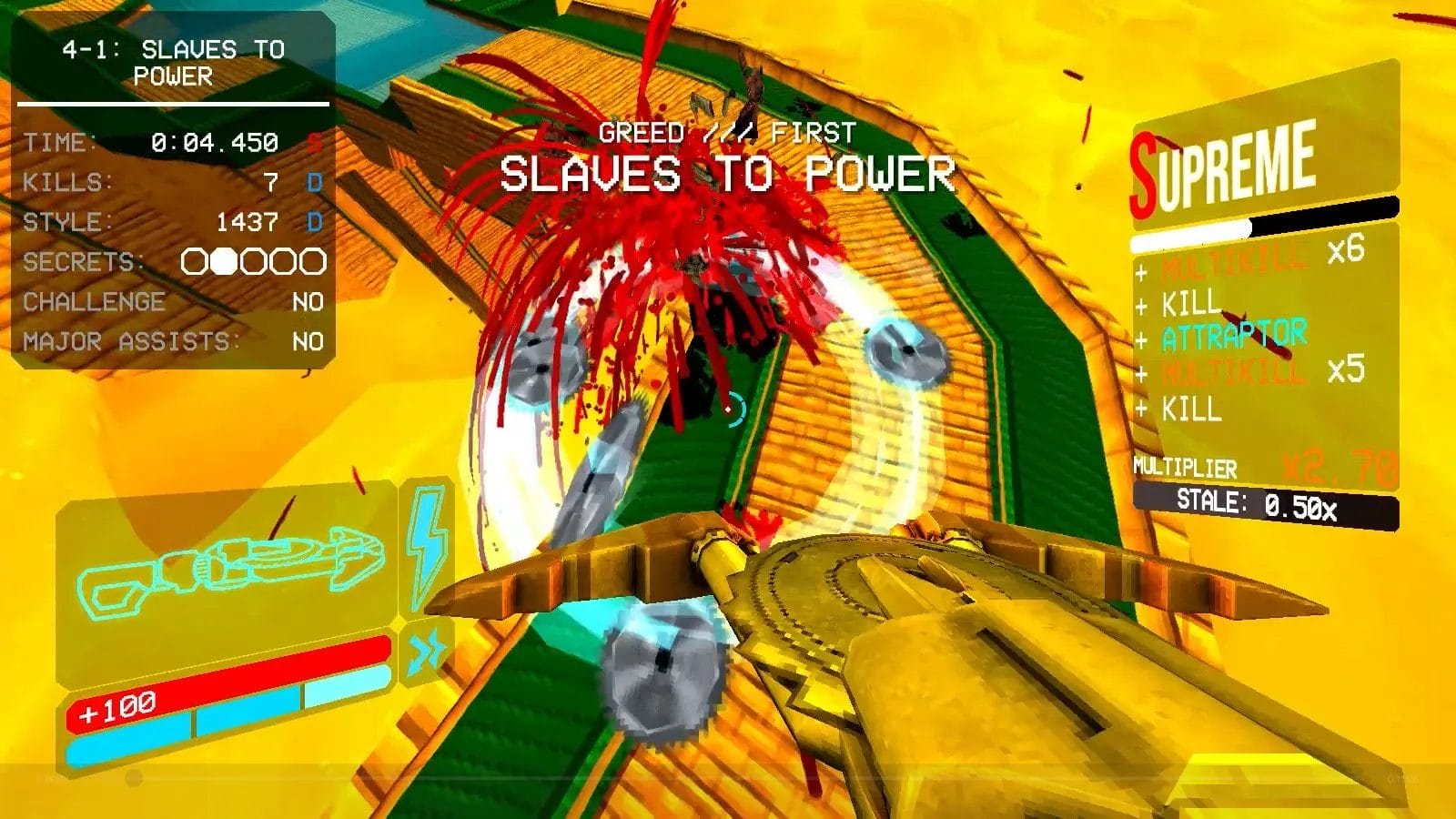
Double-tap TAB to activate the HUD. This shows your kills, time, and style in real time, making it much easier to know if you are on track for P-rank.

Slaves to Power

2. Unlock All Alternate Weapons

Make sure you unlock the Alternate variants for the Revolver, Shotgun, and especially the Nailgun. These alternates give you more flexibility and greatly improve both your kill speed and style generation. Having them available makes P-ranking runs much smoother and more consistent.
Slaves to Power

 3. Memorize Enemy Spawn Locations

Memorizing where enemies appear is one of the biggest keys to saving time in a run. When you know spawn locations ahead of time, you can plan your route and chain kills way more smoothly without wasting time on looking for each enemy.

4. Use the Marksman Revolver for Cleanup

Even if you know where enemies spawn, it’s still easy for one or two of them to slip out of your line of sight and ruin the All Kills requirement. In these situations, the Marksman Revolver is great for quick cleanup, since its coin shots can hit enemies anywhere in the area as long as they’re still alive.

5. Keep Switching Weapons for Maximum Style

Make sure you are constantly swapping weapons. You get the most style from fresh weapons, which is 3x, but if you keep using the same weapon, the multiplier can drop to 0.5x, cutting your style gain in half. Rotating through weapons keeps your style generation high.

6. Learn Insta Kills for Difficult Enemies

Some enemies waste a lot of time if you fight them normally, so learning how to insta-kill them is extremely useful. For example, you can delete a Cerberus in seconds by firing a cannonball at it, grappling it back, and parrying it into its face. A fully charged Impact Hammer to a Malicious Face, paired with good movement, also drops it before it becomes a problem.

7. Use Parry Aggressively

Parrying isn’t just a defensive tool. A successful parry fully restores your health, stuns enemies that try to melee you, and sends projectiles back at the enemies for huge damage. Each parry also grants 100 style points, making it a powerful way to boost your style while staying alive.

Topic Authority 17 Years Active • 5 Posts

Independently covering tips since 2009. Our archive includes 5 entries connected to this topic.

Recent in tips: Downloading and extracting PDF RPGs! (January 2010)

View tips Archive →

Quick Links

  • Stream Ultrakill
IH

About The Author

Irtaza Hashmi is a writer and A-Level student based in Pakistan. When not focusing on his studies, he explores the world of narrative through cinema, anime, and gaming.

Related

Filed Under: PC Tagged With: tips

  • Advertising Disclaimer: As an Amazon Associate I earn from qualifying purchases. Geek Native also earns money through DriveThruRPG and Skimlinks. Find out how.
Subscribe
Notify of
guest

guest

This site uses Akismet to reduce spam. Learn how your comment data is processed.

0 Comments
Oldest
Newest Most Voted

Quick Links

  • Archives
  • Become an Event Sponsor
  • Chat Portal
  • Cookie Policy (UK)
  • Geek Conventions
  • Kickstarter Heat
  • Newsletter
  • Patreon
  • Resources
  • RPG Publisher Spotlight
    • RPG Publisher Spotlight Nominations
  • Social Media
  • Tabletop Scotland
  • UK Games Expo
  • Wyrm Watch
  • Podcast: Audio EXP

Related Posts

  • Dating & Dragons: Romance a buff half-orc in this…
  • Neverwinter Nights
  • The importance of Photo Mode in modern gaming
  • Sam Hulick signs on for Baldur's Gate: Enchanced Edition

Info

  • Contact Us
  • Corrections
  • Privacy

Columns

  • Routinely Itemised TTRPG News
  • Quick mini-reviews
  • Quick highlights podcast
  • Recent Kickstarters 
  • Competitions!

Follow Us

Social Media

Recent Posts

  • Exandria Encore: 16 Critical Role graphic novels and lore books hit Humble Bundle
  • Worldbuilding: Coriolis – The Great Dark
  • D&D writers secure Wizards of the Coast’s full share of the Anthropic AI copyright payout

Supporters

  • Patreon

Copyright © 2026 · News Pro Theme on Genesis Framework · WordPress · Log in

Accept cookies?

To provide the best experiences, we and our partners use technologies like cookies to store and/or access device information. Consenting to these technologies will allow us and our partners to process personal data such as browsing behavior or unique IDs on this site and show (non-) personalized ads. Not consenting or withdrawing consent, may adversely affect certain features and functions.

Click below to consent to the above or make granular choices. Your choices will be applied to this site only. You can change your settings at any time, including withdrawing your consent, by using the toggles on the Cookie Policy, or by clicking on the manage consent button at the bottom of the screen.

Functional Always active
The technical storage or access is strictly necessary for the legitimate purpose of enabling the use of a specific service explicitly requested by the subscriber or user, or for the sole purpose of carrying out the transmission of a communication over an electronic communications network.
Preferences
The technical storage or access is necessary for the legitimate purpose of storing preferences that are not requested by the subscriber or user.
Statistics
The technical storage or access that is used exclusively for statistical purposes. The technical storage or access that is used exclusively for anonymous statistical purposes. Without a subpoena, voluntary compliance on the part of your Internet Service Provider, or additional records from a third party, information stored or retrieved for this purpose alone cannot usually be used to identify you.
Marketing
The technical storage or access is required to create user profiles to send advertising, or to track the user on a website or across several websites for similar marketing purposes.
Statistics

Marketing

Features
Always active

Special features

Special purposes
Always active

  • Manage options
  • Manage services
  • Manage {vendor_count} vendors
  • Read more about these purposes
Manage options
  • {title}
  • {title}
  • {title}
wpDiscuz
Loading Comments...
PC
7 Beginner-Friendly Tips to P-Rank Every Level in ULTRAKILL time to read: 2 min
0/5
◄ Tabletop & RPGs Hit Point Press reveals a criminal underworld for 5e in Most Wanted
Tabletop & RPGs ► Genre Police: The 5-Step Campaign Refresh
pixel